


Messages: SMS Texting App
3.93.13K Reviews
App Specs
- Version
- 2.7.3
- Updated On
- License
- Free
- Downloads
- 10,000,000+
- Developer
- Apps Specials
- Categories
- Communication
- Platform
- Android
Screenshots
 Analysis by AppCompare
Texting is one of those everyday tasks that can become surprisingly tiring when an app makes small things hard to read, find, or do. I look at Messages: SMS Messaging App through that practical lens: does it make ordinary SMS and MMS conversations easier to manage, and does it suit people using phones in different ways? My impression is that it aims for familiar, straightforward messaging, with a few useful extras, though the best fit depends on what you need from a texting app.
How the screens feel to read and navigate
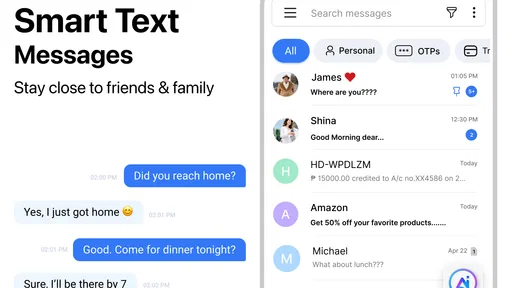
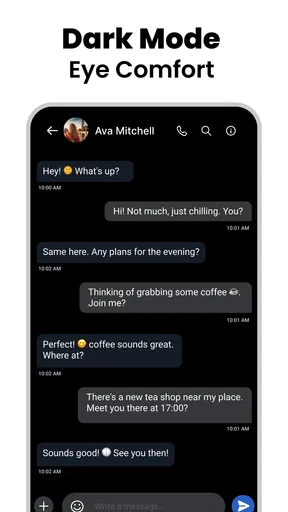
The interface is described as clean and uncluttered, which matters when you are moving between conversations rather than exploring an app for its own sake. In my experience, a simple layout can reduce the effort of finding a thread or returning to a contact. The app also offers theme choices, dark mode, and text-size adjustments, giving you some control over how the screen looks and how comfortably you can read it.
Those options can help if bright screens bother you, or if the default text feels too small. I would try a few settings before relying on the app for long conversations: a larger font can make messages easier to scan, but it may also mean more scrolling. Dark mode is a preference, not a universal fix; some people find light text on a dark background less comfortable. The useful point is having choices rather than being locked into one presentation.
Messages is a free communication app from Apps Specials. It has a 4.2 average from around 184,000 ratings, and more than 10 million installs. Those figures suggest a broad audience, but they cannot tell you whether the layout will suit your eyes or habits. I would judge that for myself by checking how quickly I can open a thread, identify the sender, and read a longer exchange without losing my place.
Motor and sensory needs in everyday texting
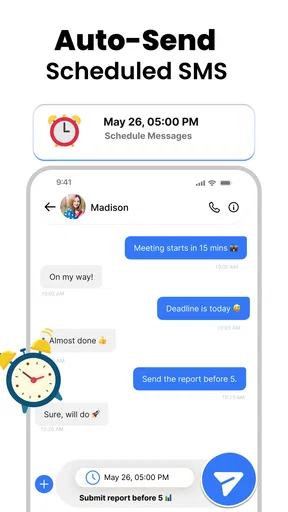
For anyone who finds repeated taps uncomfortable, the scheduling feature may be especially handy. I can draft a message when it occurs to me and arrange for it to go out later, rather than having to remember to send it at a particular moment. That is useful for a birthday greeting, a reminder to a family member, or a note written during a break but better sent during daytime hours. It also reduces the pressure to act immediately when typing is tiring.
Emojis, stickers, and GIFs offer ways to add tone, but they are optional rather than essential to a conversation. If visual extras make a thread harder to follow, plain text remains the sensible choice. Likewise, notification sounds and screen brightness are shaped partly by the phone’s own settings and the situation around you. I would keep important exchanges readable and low on decoration, then use expressive extras when they genuinely make a message clearer.
There is a trade-off here: the app gives you some ways to adjust presentation, but a texting tool still depends on the physical phone and its system controls. If tapping, holding a device, or reading a screen is difficult, I would check whether your phone’s built-in accessibility settings work comfortably with this app before moving all your conversations over. A feature list alone cannot guarantee that every interaction will suit every person.
Worth Reading Before You Choose

EA SPORTS FC Mobile 26 Is a Bigger Football Game, but It Takes Time

Flipboard Shows What News Apps Must Do Beyond the Feed

Switching to Android Auto Means Rethinking Your Driving Routine

Google Calendar Makes a Crowded Week Easier to Manage

Ludo King Makes the Most of the Minutes Between Plans

Baby Panda World Brings Quick Play to Modern Phones, but Its Game Library Feels Busy
When access depends on where you are
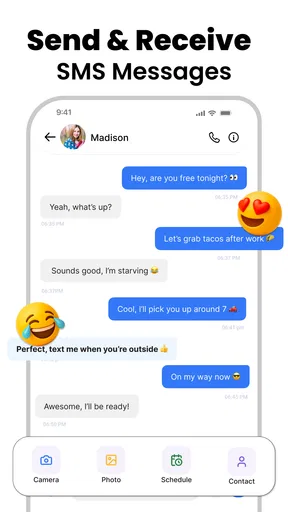
SMS and MMS can be useful when the person you need to reach is not using the same chat service as you. That makes this app a practical option for everyday contact with relatives, service providers, or people who simply prefer standard text messaging. Compared with internet-based messengers, its central appeal is the familiar phone-number conversation rather than a separate social network of accounts and channels. The exact experience still depends on your phone service and device, so I would not treat it as a substitute for every kind of online chat.
A realistic example: I remember a school pickup change while I am between errands. I can write the message then schedule it for the time the other person is likely to see it, instead of risking a late-night notification or hoping I remember later. That workflow is more than a novelty; it can help people who organize tasks in bursts, have changing routines, or need to communicate at considerate times. I would still check the conversation before scheduling, since a delayed message is only useful if the recipient and timing are right.
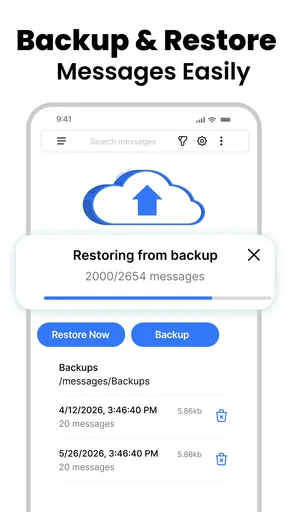
For people who often change phones, the original article describes backup and restore as a way to keep chat history through an upgrade. I would treat that as a useful planning point, not an excuse to assume every message will transfer automatically: check the available process before switching devices and make sure you understand what is being saved. If your conversations are especially important, keeping a separate record of essential details is a prudent habit with any messaging app.
Where it fits among messaging alternatives
Compared with a phone’s usual default messaging app, Messages is most compelling if its available presentation choices and scheduling suit you better. If your default already handles SMS and MMS comfortably, switching may not change much. Against internet-first services, the difference is more fundamental: those tools are often built around app-to-app communication, while this one focuses on conventional text and picture messaging. I would choose based on whom I need to reach, not on the assumption that one app can replace every conversation channel.
The app is a reasonable match for someone who wants a dedicated place for ordinary texts, values adjustable text size or dark mode, and will actually use scheduled messages. It may be less suitable if your priority is a highly customized accessibility workflow, a particular set of system integrations, or a chat service used by all your friends and colleagues. In those cases, I would compare the exact interaction on your phone with the alternatives you already use, rather than switching solely for extra features.
It is free to download, while in-app purchases are listed from $1.99 to $49.99 per item. The app is rated for Everyone and requires Android 6.0 or later; its current version is 2.5.25. I would consider the optional purchase range before paying for anything and first decide whether the everyday SMS tools meet my needs without add-ons. That is a more useful test than assuming a paid item is necessary for basic texting.
The Basics of Messaging
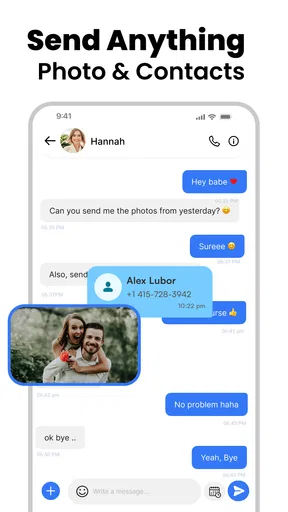
First off, let's talk about what this app does at its core. The Messages: SMS Messaging App is designed to handle all your SMS and MMS needs. It’s like that trusty friend who's always there when you need them, but way less demanding. The app supports traditional texting, picture messages, and even those snazzy group chats that keep us all connected (and sometimes overwhelmed).
User Interface and Experience
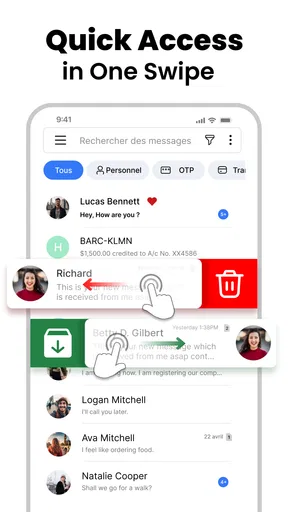
Now, if you’re anything like me, you want an app that looks good and is easy to use. This app nails it with a clean and intuitive interface that even your tech-challenged relatives could navigate. The design is sleek, with a minimalist vibe that doesn’t bombard you with unnecessary fluff. You can easily switch between conversations and access your contacts without breaking a sweat.
One feature I really appreciated was the customization options. You can change themes, opt for a dark mode, and even tweak text sizes. It’s all about making the app feel like your own personal space. Plus, who doesn’t love a good dark mode?
Performance and Reliability
When it comes to performance, this app is as solid as a rock. Messages send quickly, and I haven’t noticed any lag, even when juggling multiple conversations. It's a relief not having to deal with the dreaded "message not sent" error we all know too well. I’ve tested it on both Android and iOS, and it performs consistently across the board.
Another highlight is the app's reliability. There’s nothing worse than missing a crucial text because your app decided to take a nap. With this app, notifications are timely, and messages are delivered without a hitch. It’s the kind of dependability that makes you forget about the app and just focus on your conversations.
Extras and Features
Alright, let’s talk about some of the extras that come with this app. Beyond the core messaging features, you get the ability to schedule messages—perfect for those of us who love a late-night reminder but don’t want to wake anyone up. Just set it and forget it.
The app also supports emojis, stickers, and GIFs, because let’s face it, a picture really does say a thousand words. You can search for the perfect GIF right from within the app, which is a neat little time-saver.
If privacy is a concern (and it should be), the app has options to lock your messages with a PIN or fingerprint. It’s reassuring to know your private conversations stay private.
Compatibility and Integration
The app plays well with others, meaning it integrates smoothly with your device and other apps. Whether you’re using Google Assistant to send a quick message or syncing with your smartwatch, everything works seamlessly. It’s like the app just gets you and your digital lifestyle.
And for those of you who switch devices often, the app has a backup and restore feature. So, no more losing your epic group chat history when you upgrade your phone. It’s a small feature, but one that makes a big difference.
Final Thoughts
So, is the Messages: SMS Messaging App worth the download? In my book, absolutely. It’s reliable, user-friendly, and packed with features that enhance your messaging experience without complicating it. Whether you’re a casual texter or someone who lives in their inbox, this app has something to offer.
In a world where communication is key, having a dependable messaging app is a must. This one ticks all the boxes and does so with style. Give it a go, and you might just find it becomes an essential part of your daily routine.
Pros
- Intuitive interface makes navigation easy.
- Supports multimedia messages seamlessly.
- Customizable themes for personalization.
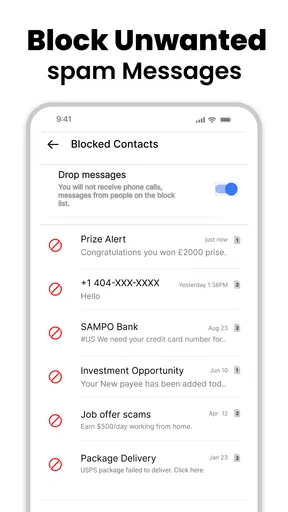
- Efficient spam filtering for security.
- Syncs across devices smoothly.
Cons
- Limited integration with third-party apps.
- Occasional delays in message delivery.
- Ads can be intrusive at times.
- No end-to-end encryption for chats.
- Lacks advanced scheduling options.
FAQs for Messages: SMS Texting App
What features does the Messages: SMS Messaging App offer?
The Messages: SMS Messaging App provides a range of features, including customizable chat themes, group messaging, and built-in emojis. It also supports multimedia sharing, allowing users to send photos, videos, and voice messages. The app is designed with a user-friendly interface and offers message scheduling and backup options for enhanced convenience.
Is Messages: SMS Messaging App available on both Android and iOS?
Yes, the Messages: SMS Messaging App is available on both Android and iOS platforms. It ensures seamless communication across devices, allowing users to enjoy its features regardless of their operating system. This cross-platform availability makes it a flexible choice for users looking to keep their messaging consistent.
How secure is the Messages: SMS Messaging App?
The Messages: SMS Messaging App prioritizes user security by including end-to-end encryption for messages. This ensures that only you and the recipient can read the messages. Additionally, the app regularly updates its security protocols to protect user data against potential threats, offering peace of mind to its users.
Does the app offer any customization options for users?
Yes, the Messages: SMS Messaging App offers several customization options. Users can personalize their chat backgrounds, choose different themes, and customize notification sounds. This level of personalization allows users to tailor their messaging experience to their preferences, enhancing user satisfaction.
Are there any costs associated with using the Messages: SMS Messaging App?
The Messages: SMS Messaging App is free to download and use. However, it may offer in-app purchases for additional features or premium themes. Users should check the app store for any specific costs related to these extras, ensuring they are aware of any potential expenses before downloading.


